On the 11th of Augutst, an update was made with some new features and bug fixes.
The new features are:
- Sorting order in the library
The repository now remembers the chosen sorting order so you don't have to change it everytime you swith to another folder - Open/Closed access for Planner
It is now possible to set a Plan to Closed access so it only is accessible for users with access to the Workspace it is stored in or Library it is publiched to.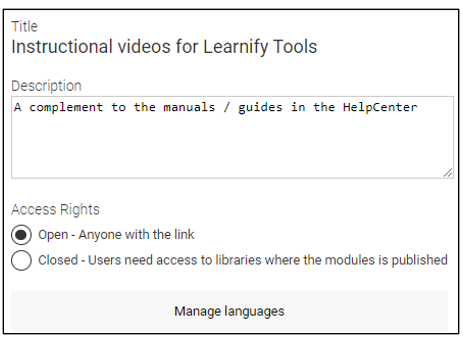
- Support for imported Scorm packages in a plan.
Planner now supports adding Scorm packages from other authoring tools. Note that the Scorm package has to be imported to the library first. If you export the plan as a Scorm package to be used in an LMS it is important that you include content files in the exported package. Otherwise progress reporting won't work for the Scorm package in the plan. - Clearing of stored progress for a module from Author
When developing a module and testing it is sometimes necessary to clear the stored progress. Now there is an option for that in Author. Next to the Preview button there is an arrow. When clicked you can choose "Restart/Clear stored progress and preview the module".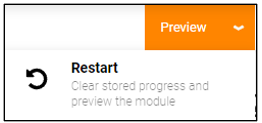
This will delete stored progress so you can preview the module as a normal user would see it. - Max width for Majestic theme
When the Majestic theme is used, it normally defaults to showing the module in full width. In some cases it can result in poor readability. Especially for users with Ultra wide screens. If you want to restrict the width it is now possible to do. In module settings there is now a setting called "Max width (Majestic desktop theme)".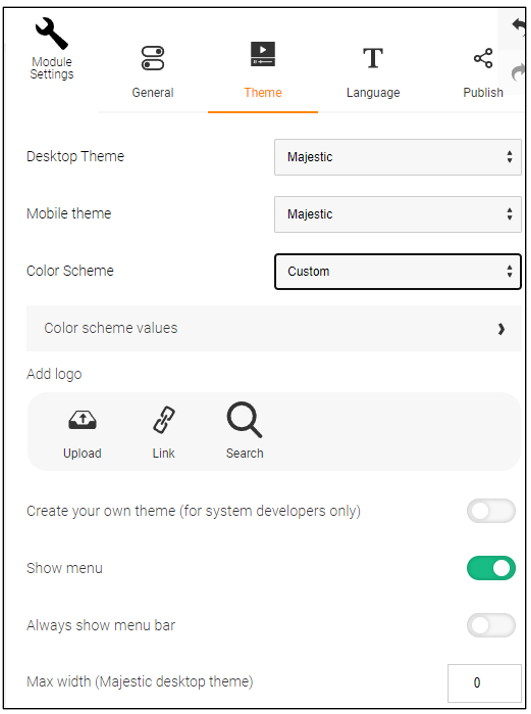
The default value is 0 which means no restriction. If you add a value (in pixels) The module will be played using that value as the maximum width. If you play the module in a smaller window, the module will still be resized to fit the window.
What has been corrected is:
- There has been an issue where archive copies weren't saved correctly while editind a module making it hard for us to restore a previous version of a module. This has been corrected so an Archive copy is saved every 5 minutes while editing a module.
- Sometimes a module would not load and only show a blank page. A timing issue has been corrected to prevent this from happening.
0 Kommentarer