On the 2nd of June, an update was made with a new template as well as some changes and bug fixes.
What has been changed / corrected is:
- A new template called Table Notes has been introduced. The template is based on "Multiple notes" but the notes are presented in tabular form instead of one after the other.
The template can, for example, be used for a plan where you want to list points such as What to do, who should do it and how it should be done. The table can then be retrieved in the Download saved answers template in the same way as other notes. - Autostart of audio on pages. Previously, sounds could be added to a page in the Majestic theme. The sound has then been played when the user clicks on a button. It is now possible to select so that the sound starts automatically when the page is displayed. This is available in both Standard and Majestic themes.
In Author, go to a page and open the Audio & Text Mode tab. Under the option to upload, link or record audio for the page, there is now a setting to start the audio automatically.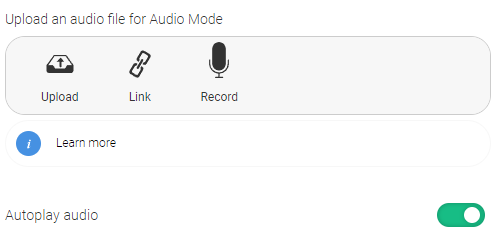
- Correction for language of the module title when exporting a language variant as a Scorm package. Previously, the title of the exported package was in the master language, not the language of the exported module
- Clarification in the template Self-assessment. The self-assessment template is intended to be used both before and after an education so you can compare the answer. On the page where it is used after the training, a link should be made to the page where it is used before the training. A text change has been introduced to clarify that the link only needs to be made on the page where it is used after the training.
- A fix for the "Javascript, HTML & CSS" template has been introduced. The supplier of the editor used in the template has changed the implementation. Corresponding changes in order to match the implementation has been made in the repository.
0 Kommentarer