On the 3rd of March an update was made with some new features, some changes and some bug fixes.
What's new is:
- Semi-automatic translation in Author via Google. A while ago, we introduced support for multiple languages Author. Now we have also added a semi-automatic translation of content, player- and button texts. As it is a Google translation, we call it semi-automatic because you should go through the translated texts and check that the result of the translation is correct.
In Module settings / Language tab You can find a Manage languages button.
There you click on Add, select a language in the list and choose whether the content should be copied or translated. If content is copied, the texts from Master language is copied to the new language. If translate is chosen all texts are translated to the new language via Google translate.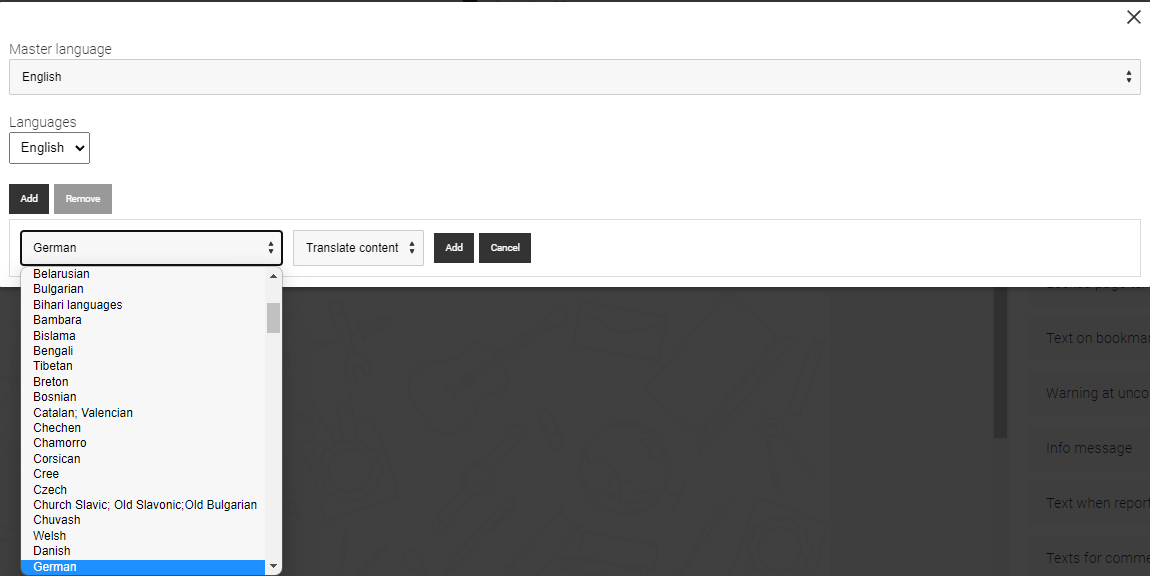
Finally, click Add to start the process. If you want to add more languages, repeat the steps.
When you are done, close the dialogue with X in the upper right corner. - Multilingual support in Planner. In Planner there is also the possibility to add more languages and get a semi-automatic translation of texts. It works the same way as in Author. The only difference is that the Manage Language button is found in the right column.
Please note that it is only texts in Planner that will be translated, not the added modules. Modules still have to be translated in Author.
When adding modules to Planner, you only select the module, not a specific language. When the Planner is played or exported, the modules are played/exported using the language selected at the time. If some modules do not have the selected language, they will use the master language.
What has been changed / corrected is:
- When the template Rank is used in the player, we have received comments that you can not drag in the "Numbers" to move the options. This has changed so it is also possible to drag and drop there.
Centering Text When Viewing View Mode is Show No Wallpaper or As Wallpaper. Under certain conditions, centered body text could end up skewed. This is corrected so the text should be centered correctly. - A mistake regarding backwards compatibility was made in the last update. Old material where the template Download saved answers isused, default text for the choice if All comments or My comments should be saved in the Pdf was not included. This is corrected so that older material should work correctly.
0 Kommentarer