Once you have created your blog and written the first post, you’ll probably want to share it to your target group. There are a few ways to do that.
Share your blog openly with anyone who has access to the link.
Post the link to your blog anywhere you like. When people click the link, they will be redirected to your blog. Please observe that the blog visitors do not need to have an account to the repository to access the blog and read the posts.
Locate and click Share - the button at the top of the blog window.
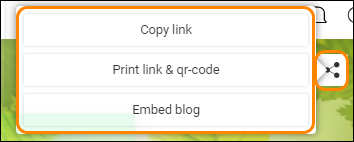
Now you can choose amongst:
Copy link - once you click this option, the URL for the blog will be copied to your clipboard and you can paste it anywhere you want to.
Print link & QR-code - click here to get a printable page with the blog’s URL and QR-code.
Embed blog - click here to access your blog’s embed code.
Tip: Want to keep your blog private? Go to settings and set a password for your blog.
0 Kommentarer